
Connect Card Help
for Comdata App Users
For assistance with your account, please get in touch with our Cardholder Services team at either of the numbers below:
-
- Call 1-800-741-6060 and follow the voice prompts.
- For Spanish cardholders, call 1-800-266-3914 and follow the voice prompts.
You will need your card number when calling.
Contact Cardholder Services at the 1-800 number on the back of your card, and our service team can help you initiate the dispute process.
Your Fleet Administrator has approved you to add your Comdata card with the number shown in the e-mail to a new or existing Comdata mobile app account.
Upon discovering that your Comdata Card is missing or damaged, contact Cardholder Services at 1-800-741-6060 to block your card and order a replacement.
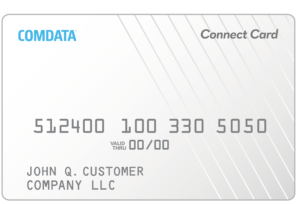
The card number will include the small numbers above the embossed card number on the card’s front side. Please get in touch with your fleet administrator for assistance if you do not have the card.
We don’t have that feature available at this time.
- Open the Comdata Mobile App.
- Enter the invitation code sent by text or email.
- Follow the prompts to finish adding the card.
- Tap Add or Apply for Card on the app homepage.
- Add the full 16-digit card number and tap Submit.
- You will receive a verification email (the email address your company provided) with a verification code to add your card.
- Enter the verification code into the mobile app along with a card nickname and tap Submit.
- Once complete, you’ll see your newly added card on the home screen.
1. Locate Comdata in the Apple or Google app store and install it.
2. Launch the app and tap Register on the login screen.
3. Choose the appropriate user type:
- Fleet Owner (Account Administrator who has NOT self-registered on Driven Web)
- Driver (Cardholder or Driver)
- Guest (For users exploring or inquiring about an account)
4. Fill out the registration form with your first name, last name, mobile phone number, and email address. Enter your Password and confirm your password, and then check the box to agree to the Terms and tap Submit.
5. If you selected Fleet Owner, you must also provide the ZIP/Postal Code (linked to billing address) and Account Number.
6. Verify Your Contact Information
- A verification code will be sent to your mobile phone via text message.
- Enter the code in the app to verify your phone number.
- A second verification code will be sent to your email address.
- Enter the email code in the app to complete verification.
Other Resources
Privacy Policy
Cardholder Terms and Conditions
- End User License Agreement
- To obtain a copy of your Cardholder Agreement and/or Fee Schedule, contact our Cardholder Services team by calling the number on the back of your card and requesting to speak with an agent.